Network Types: LAN, WAN, and the Internet Explained
When two computers share information, they form a network, and when millions of networks join together, they form the internet. Understanding network types LAN WAN internet explained in simple terms means learning how networks differ by size: the small network in a home or classroom, the wide network that crosses cities and countries, and the giant network of networks that is the internet. This guide compares them with examples from your own school and home, and shows how data travels between them.
What Is a Computer Network?
A computer network is a group of computers and devices connected so they can share information and resources. In a classroom network, pupils share one printer, teachers share files with the class, and every computer reaches the internet through one connection. Without a network, each computer would stand alone, and sharing a file would mean carrying it on a USB drive from desk to desk.
Networks give three main benefits. They share resources, so one printer and one internet connection serve many computers. They share information, so the same files and records are available wherever they are needed. And they support communication, so people can send messages and work together. Almost every computer you use at school or at home is part of a network, even when you do not notice it.
LAN: Networks Close to Home
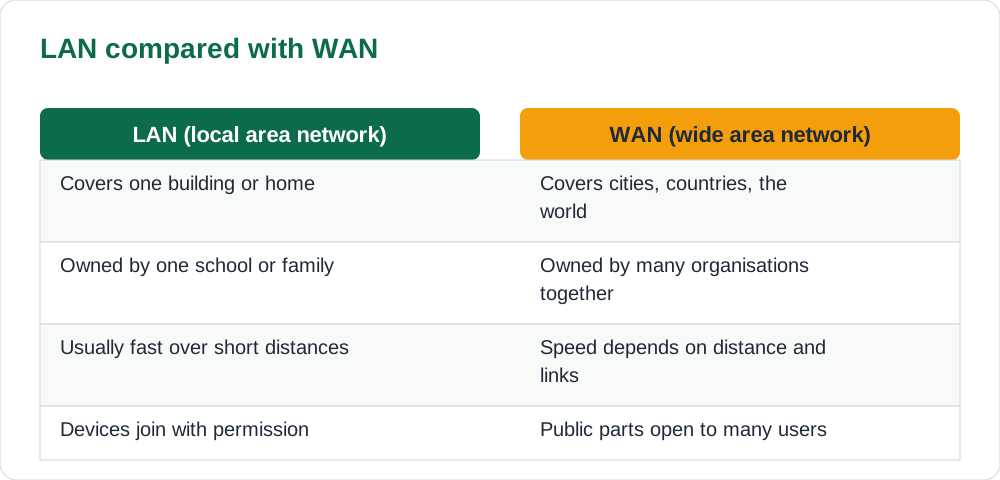
A LAN, or local area network, covers a small area: one home, one classroom, one school building, or one office. The computers in a LAN are close together and connected by cables or by Wi-Fi through a device called a router or a switch. Because the distances are short, a LAN is usually fast, and the school or family owns and controls it. Your home Wi-Fi is a LAN, and so is the computer lab at school.
On a school LAN, you can send a file to the printer, open a shared folder, or work on a class activity with classmates without using the internet at all. The network belongs to the school, which is why the school sets rules about what may be shared and which sites may be used. A LAN is private: only devices the owner allows may join it, and a password keeps strangers out.
WAN and the Internet
A WAN, or wide area network, covers a large area: a city, a country, or the whole world. A WAN is made by joining many LANs together with long-distance links, such as fibre cables, telephone lines, and satellites. A bank connecting its branches in different cities uses a WAN, and a school board connecting its schools uses one too. A WAN is usually owned by many organisations working together, not by one person.
The internet is the largest WAN of all, a network of networks that joins millions of LANs and WANs around the world. When you watch a video from another country, your request travels from your home LAN, across several WAN links, to the computer that holds the video, and the video travels back the same way. No single person or company owns the internet. It works because networks agree on shared rules for sending and receiving data.
How Data Travels
Data does not travel as one long stream. It is split into small pieces called packets, each labelled with the address of its destination. The packets travel separately, sometimes by different routes, and the receiving computer puts them back together in order. This is why a video can keep playing even when the network is busy: the packets simply take whichever route is free.
Every device on a network has an address, so packets find their way. A home router gives each device a local address on the LAN, and the router itself has a public address on the internet. When you type a website name, a service called DNS turns that name into the number address of the computer holding the site. Pupils do not need to memorise these numbers, but understanding that addresses make delivery possible explains why networks work at all.
- Data is split into small packets, each with a destination address.
- Packets may travel by different routes and are reassembled on arrival.
- Every device has an address so packets can find it.
- Website names are translated into number addresses before delivery.
Staying Safe on Shared Networks
Networks are shared places, so they need shared rules. On a school network, use only your own login, keep your password secret, and never try to open folders that belong to teachers or other pupils. On public Wi-Fi, such as in a shop or a park, avoid logging into important accounts, because strangers on the same network may be watching. If the school network blocks a site, the block is there for a reason, and working around it can put the whole network at risk.
Treat every network as a place where others can see what you do. The same safety habits that protect you online protect the network too: strong passwords, care with strangers, and telling a teacher when something looks wrong. You can revise those habits in our guide to internet safety rules pupils. A careful user is the strongest part of any network.
AI Help: Muse AI
Muse AI is Meta's personal AI assistant, and it can help with sketching a diagram of your home network from a list of your devices. Muse AI does not give official Sindh Textbook Board answers — always verify against your Sindh Textbook Board book and your teacher.
Join Muse with invite code LTGSWD — in the Muse app, go to Settings > Redeem token and enter the code.
Disclosure: LTGSWD is the author's Muse invite code.
5 key points you must know
- A network is computers connected to share information and resources.
- A LAN covers a small area such as a home or school.
- A WAN covers a large area by joining many LANs together.
- The internet is the largest WAN: a network of networks.
- Data travels in packets, each labelled with a destination address.
Frequently asked questions
Is my home Wi-Fi a LAN?
Yes. Your home Wi-Fi connects the devices in one home through one router, which is exactly what a local area network is.
What is the difference between the internet and a WAN?
A WAN is any network covering a large area. The internet is the largest WAN, joining millions of smaller networks around the world into one network of networks.
Who owns the internet?
Nobody owns the whole internet. It is made of many networks owned by different organisations, all working together under shared rules for sending data.
Why is public Wi-Fi risky for important accounts?
Because strangers share the same network and may be able to watch traffic on it. Avoid logging into banking or other important accounts on public Wi-Fi.
Solved notes — preview free
These guides work best with the solved exercises. Preview the solved notes free on this website — 119 solved notes for Classes 6–10 in Sindhi, Urdu, English and Arabic medium. Or browse the full solved notes catalogue for your class and medium. New solved notes are added regularly — check the catalogue for coming-soon books.