Keeping a Computer Lab Journal That Examiners Trust

A computer lab journal is different from other practical notebooks, because the work happens on a screen and the examiner cannot watch you type. The journal is the proof that you did the work yourself, understood it, and tested it, so it must show the problem, the code, the output, and your own thinking about what happened. A journal that contains only copied code with no dates, outputs, or reflections looks suspicious even when the work is genuine, while a journal with dated entries and honest notes about errors is trusted at a glance. This guide shows how to keep a computer lab journal that proves real, regular work.
Dated Entries in Lab Order
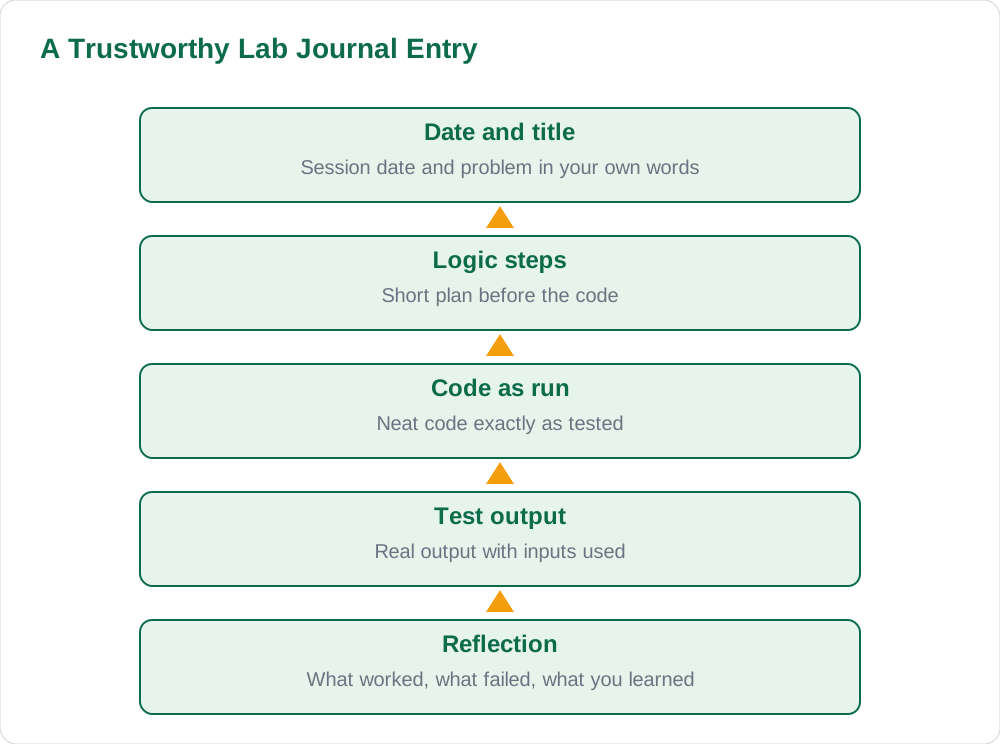
Date every lab journal entry and keep the entries in the order the work was done, because dates and sequence are the simplest proof that the journal was built up over the term rather than written in a rush at the end. Start each entry with the date, the lab session number if your school uses one, and the title or problem statement of the task, written in your own words. If a task took more than one session, give each session its own dated entry and note that it continues the previous work, so the examiner can follow the progress. A journal with regular dates spread across the term immediately looks more credible than one with identical handwriting and no dates at all.
Write entries in the lab or on the same day, while you remember what you tried, what failed, and what you changed, since a journal reconstructed weeks later loses exactly the details that make it believable. If you must finish an entry later, say so honestly and work from the saved program file rather than from memory alone. Keep the journal's index or contents list up to date in the same way as a science notebook, listing each program or task with its date and page number. Dated, ordered entries turn a pile of code printouts into a record of learning that an examiner can follow from the first program to the last.
Problem, Logic, and Code
Each journal entry should begin with the problem in plain language, then a short note on the logic or steps you will use, and only then the code itself, because the examiner wants to see thinking, not just typing. Write the problem as a task to solve, for example to find the largest of three numbers entered by the user, and follow it with the steps in order, such as read the numbers, compare them, and print the largest. This short plan, sometimes called an algorithm, shows that you designed the program before writing it, and it makes the code far easier to read. Pupils who skip the plan often produce code that works by accident and cannot be explained in a viva.
Write the code neatly, with consistent indentation and clear variable names, exactly as it ran in the lab, and do not tidy it up afterwards into a version that was never tested. If you handwrite the journal, copy the code carefully from the working program, checking brackets and spelling character by character, since a single wrong character can change the meaning. If you paste printed code, attach it neatly and still write the problem and logic by hand, so the entry is clearly your own work. Code that matches its stated logic, with names that make sense, is the core of a trustworthy computer journal. For more study material, see the solved notes and the book collection.
Real Output and Test Cases
Record the actual output of each program, copied from the screen or pasted as a printout, together with the input values you used to test it, because output is the evidence that the program ran. Show at least two test cases where the task allows it, such as a normal input and a boundary or unusual input, and write the expected result beside the actual result so the examiner can see whether they matched. If the output was wrong on the first run, record that too, with a note on what you changed, rather than presenting only the final correct run as if it worked first time. Honest testing history is one of the strongest signs of genuine lab work.
Do not invent output, and do not copy output from another pupil's program, since output that does not match the code is easy to spot and destroys trust in the whole journal. If a program produced an error message, record the error and the fix in your own words, because debugging is real programming work and examiners respect a journal that shows it. Keep outputs attached in order, aligned with their entries, and label each one with the program title and date so a loose printout cannot be mistaken for another entry's output. A journal where every program has matching input, code, and output is a journal the examiner can believe.
Reflection: What You Learned
End each entry with a short reflection of two or three sentences on what the program taught you, what went wrong, and what you would do differently, because reflection turns a code listing into evidence of learning. A reflection might note that a loop condition caused an extra repetition, that a variable name confused you, or that testing with a zero input revealed a fault you had not expected. Write it in your own words, even if it is simple, since a genuine short reflection is far more convincing than a polished paragraph copied from a textbook. Examiners read reflections to judge understanding, and a journal without them reads like a typing exercise.
Reflection also helps you revise, because reading back over your own notes on errors reminds you of the traps to avoid in the next program and in the viva. If the same error appears in several entries, note the pattern and the rule you will use to avoid it, such as checking loop boundaries before running the program. Keep reflections brief and specific to the entry, not general statements about computers being useful, which add nothing. Over a term, these short notes build into a personal record of progress that no copied journal can imitate, and they give you ready answers when the examiner asks what you learned.
Keeping the Journal Safe and Complete
Keep the program files themselves safe alongside the journal, with clear file names matching the journal entries, so any program can be found and checked if the examiner asks. Save your work at the end of every lab session, and keep a backup copy where your school allows it, such as on a school drive or a personal storage device, because a lost file near submission time cannot be recreated honestly. If a file is lost despite this, tell your teacher straight away and rewrite the program yourself, noting the rewrite in the journal, rather than copying another pupil's file to fill the gap. Honesty about a lost file preserves trust; a copied file destroys it.
Before submission, check the journal from front to back: every entry dated, every program with code and output, every reflection written, and the contents list matching the pages. Ask your teacher to review the journal once during the term if they offer it, and correct any gaps while there is still time to do the work properly. Remove loose sheets that do not belong to any entry, and make sure printouts are firmly attached so pages do not fall out during marking. A complete, ordered, backed-up journal needs no last-minute panic, and it presents a term of real work in the best possible light. More guides are on the blog and the [home page](/).
AI Help: Muse AI
Muse AI is Meta's personal AI assistant, and it can help you keep a better lab journal by explaining a programming idea in simple words or suggesting test cases for a program you wrote. Try asking it to explain a loop or a condition from your own code, then write the explanation in your journal in your own words.
Join Muse with invite code LTGSWD — in the Muse app, go to Settings > Redeem token and enter the code.
Disclosure: LTGSWD is the author's Muse invite code.
Muse AI does not give official STBB answers — always verify against your Sindh Textbook Board book and your teacher.
5 key points you must know
- Date every entry and keep entries in lab order.
- Write the problem and logic steps before the code.
- Record real output with the inputs used to test it.
- End each entry with a short, honest reflection.
- Keep program files safe with names matching the journal.
Frequently asked questions
What should one computer lab journal entry contain?
A date and title, the problem in your own words, short logic steps, the code exactly as it ran, real output with test inputs, and a short reflection on what you learned.
How many test cases should I show for a program?
Show at least two where the task allows it, such as a normal input and a boundary or unusual input. Write the expected result beside the actual result so the examiner can see whether they matched.
Should I record errors and failed runs in my journal?
Yes, record the error and the fix in your own words. Debugging is real programming work, and an honest testing history is one of the strongest signs that the journal is genuine.
Can I paste printed code and output into my journal?
Yes, if your school allows it, but attach printouts neatly in order and still write the problem, logic, and reflection by hand. The handwritten parts show the entry is your own work and understanding.
Solved notes — preview free
These guides work best with the solved exercises. Preview the solved notes free on this website — 119 solved notes for Classes 6–10 in Sindhi, Urdu, English and Arabic medium. Or browse the full solved notes catalogue for your class and medium. New solved notes are added regularly — check the catalogue for coming-soon books.